> ## Documentation Index
> Fetch the complete documentation index at: https://docs.jar.rip/llms.txt
> Use this file to discover all available pages before exploring further.
# Embeds
> Understand how to create and use embeds in jar.
## Introduction
Embeds have a specific structure that allows you to create rich content in your messages.
They can include fields, images, and other elements that make your messages more visually appealing.
You can use them in various parts of jar such as welcomers, leavers, autoresponders, and more.
## Too long to read?
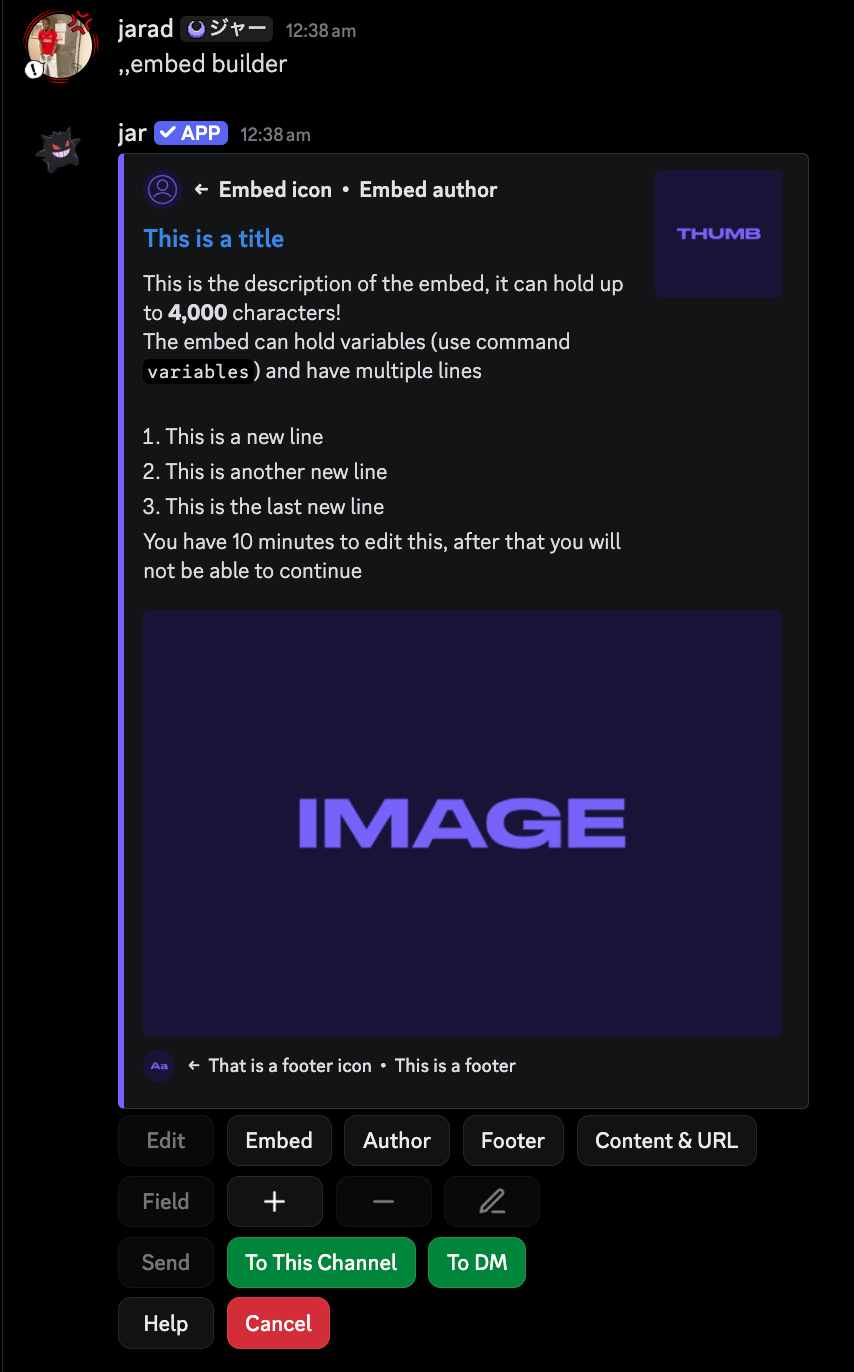
If you're not interested in reading this entire page, you can use our **native embed builder**
to create embeds without needing to understand the code structure.
You can access the embed builder by running the `embed builder` command in any channel where jar has access.
Once you're finished building your embed, you can send the code of the embed to the current
channel or to your DMs, where you can copy it and use it in your configurations.
 ## Structure of an embed
An embed code is denoted by a key-value pair structure,
where the key is the name of the embed field and the value is the content of that field.
For example, the description parameter will look like this:
```yaml theme={null}
{description: This is the description of the embed.}
```
* `{` starts a parameter
* `:` separates the parameter name from its value
* `&&` is used to add multiple values to a parameter
* `}` ends the parameter
* `$v` splits multiple parameters
### Parameters available in embeds
Here are the following parameters you can use in embeds.
The content of the embed.
This is the main text that will be displayed above your embed.
```yaml Example theme={null}
{content: Welcome {user.mention}.}
```
The title of the embed.
```yaml Example theme={null}
{title: Welcome to {server.name}.}
```
The URL of the embed.
```yaml Example theme={null}
{url: https://example.com}
```
The description of the embed.
```yaml Example theme={null}
{description: Hope you enjoy your stay!}
```
The color of the embed in a hex format.
```yaml Example theme={null}
{color: #ff1f1f}
```
The image of the embed.
```yaml Example theme={null}
{image: https://example.com/image.png}
```
The thumbnail of the embed.
```yaml Example theme={null}
{thumbnail: https://example.com/thumbnail.png}
```
The embed timestamp.
This will display the time the message was created.
```yaml Syntax theme={null}
{timestamp: true|false}
```
```yaml Example theme={null}
{timestamp: true}
```
These parameters need extra arguments split by `&&`.
The author of the embed.
* `name`: The name of the author.
* `icon`: The URL of the author's icon. (**Optional**)
* `url`: The URL of the author. (**Optional**)
```yaml Syntax theme={null}
{author: name && icon && url}
```
```yaml Example theme={null}
{author: John Doe && icon: https://example.com/icon.png/ && url: https://example.com/}
```
The footer of the embed.
* `text`: The text of the footer.
* `icon`: The URL of the footer's icon. (**Optional**)
```yaml Syntax theme={null}
{footer: text && icon}
```
```yaml Example theme={null}
{footer: Powered by jar && icon: https://example.com/icon.png}
```
The fields of the embed.
* `name`: The name of the field.
* `value`: The value of the field.
* `inline`: Whether the field is inline. (**Optional**)
You can add up to **25 fields** in an embed.
```yaml Syntax theme={null}
{field: name && value && inline}
```
```yaml Example theme={null}
{field: yapping && sesh && inline}
```
The buttons of the embed.
* `label`: The label of the button.
* `style`: The style of the button - `blurple`, `gray`, `green`, `red`, `link`.
* `url`: The URL of the button. (**Required for `link` style**)
* `emoji`: The emoji of the button. (**Optional**)
* `enabled` or `disabled`: Whether the button is enabled or disabled. (**Optional**)
You can add up to **5 buttons** in an embed.
```yaml Syntax theme={null}
{button: label: text && style: text && url: text && enabled|disabled}
```
```yaml Example theme={null}
{button: label: Click me && style: link && url: https://example.com && enabled}
```
### Using variables in embeds
You can use variables in embeds to dynamically change the content of the embed.
Variables are denoted by `{variable_name}`.
For example, you can use `{user.mention}` to mention the user who triggered the embed.
Here are some common variables you can use in embeds:
* `{user.mention}`: Mentions the user.
* `{user.name}`: The username of the user.
* `{server.name}`: The name of the server.
* `{server.icon}`: The icon of the server.
* `{server.member_count}`: The number of members in the server.
Other embed variables can be found in the [variables section](/scripting/variables).
## Where to get embeds
If you're lazy like me, you can get embeds from the [support server](https://discord.gg/eNNCVemNvu) -
in the `#embeds` channel. You can also submit your own embeds to the channel for others to use.
If you're really lazy, jar has a similar embed code structure to other bots, so you can copy and paste embeds from them.
## Structure of an embed
An embed code is denoted by a key-value pair structure,
where the key is the name of the embed field and the value is the content of that field.
For example, the description parameter will look like this:
```yaml theme={null}
{description: This is the description of the embed.}
```
* `{` starts a parameter
* `:` separates the parameter name from its value
* `&&` is used to add multiple values to a parameter
* `}` ends the parameter
* `$v` splits multiple parameters
### Parameters available in embeds
Here are the following parameters you can use in embeds.
The content of the embed.
This is the main text that will be displayed above your embed.
```yaml Example theme={null}
{content: Welcome {user.mention}.}
```
The title of the embed.
```yaml Example theme={null}
{title: Welcome to {server.name}.}
```
The URL of the embed.
```yaml Example theme={null}
{url: https://example.com}
```
The description of the embed.
```yaml Example theme={null}
{description: Hope you enjoy your stay!}
```
The color of the embed in a hex format.
```yaml Example theme={null}
{color: #ff1f1f}
```
The image of the embed.
```yaml Example theme={null}
{image: https://example.com/image.png}
```
The thumbnail of the embed.
```yaml Example theme={null}
{thumbnail: https://example.com/thumbnail.png}
```
The embed timestamp.
This will display the time the message was created.
```yaml Syntax theme={null}
{timestamp: true|false}
```
```yaml Example theme={null}
{timestamp: true}
```
These parameters need extra arguments split by `&&`.
The author of the embed.
* `name`: The name of the author.
* `icon`: The URL of the author's icon. (**Optional**)
* `url`: The URL of the author. (**Optional**)
```yaml Syntax theme={null}
{author: name && icon && url}
```
```yaml Example theme={null}
{author: John Doe && icon: https://example.com/icon.png/ && url: https://example.com/}
```
The footer of the embed.
* `text`: The text of the footer.
* `icon`: The URL of the footer's icon. (**Optional**)
```yaml Syntax theme={null}
{footer: text && icon}
```
```yaml Example theme={null}
{footer: Powered by jar && icon: https://example.com/icon.png}
```
The fields of the embed.
* `name`: The name of the field.
* `value`: The value of the field.
* `inline`: Whether the field is inline. (**Optional**)
You can add up to **25 fields** in an embed.
```yaml Syntax theme={null}
{field: name && value && inline}
```
```yaml Example theme={null}
{field: yapping && sesh && inline}
```
The buttons of the embed.
* `label`: The label of the button.
* `style`: The style of the button - `blurple`, `gray`, `green`, `red`, `link`.
* `url`: The URL of the button. (**Required for `link` style**)
* `emoji`: The emoji of the button. (**Optional**)
* `enabled` or `disabled`: Whether the button is enabled or disabled. (**Optional**)
You can add up to **5 buttons** in an embed.
```yaml Syntax theme={null}
{button: label: text && style: text && url: text && enabled|disabled}
```
```yaml Example theme={null}
{button: label: Click me && style: link && url: https://example.com && enabled}
```
### Using variables in embeds
You can use variables in embeds to dynamically change the content of the embed.
Variables are denoted by `{variable_name}`.
For example, you can use `{user.mention}` to mention the user who triggered the embed.
Here are some common variables you can use in embeds:
* `{user.mention}`: Mentions the user.
* `{user.name}`: The username of the user.
* `{server.name}`: The name of the server.
* `{server.icon}`: The icon of the server.
* `{server.member_count}`: The number of members in the server.
Other embed variables can be found in the [variables section](/scripting/variables).
## Where to get embeds
If you're lazy like me, you can get embeds from the [support server](https://discord.gg/eNNCVemNvu) -
in the `#embeds` channel. You can also submit your own embeds to the channel for others to use.
If you're really lazy, jar has a similar embed code structure to other bots, so you can copy and paste embeds from them.