> ## Documentation Index
> Fetch the complete documentation index at: https://docs.jar.rip/llms.txt
> Use this file to discover all available pages before exploring further.
# Jail
> Restrict bad actors and keep your server clean with jar's jail system.
## Introduction
jar's jail system can be customized to your liking, allowing custom DMs and messages for the bad actor.
## Setting up a jail
To create a jail, you can start by running the `jail setup` command. This will create a **jail role**, a **jail channel** & a **jail log channel**.
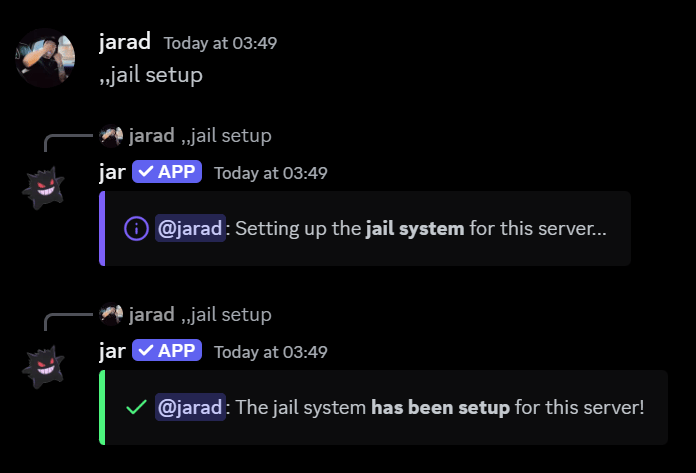 After the setup is complete, you should see 2 channels created: `#jar-jail` and `#jail-logs`.
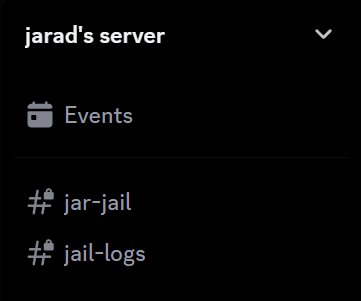 * `#jar-jail` is what the bad actors will only see, restricting them from seeing any other channels.
* `#jail-logs` is where the actions taken against the bad actor will be logged.
## Customizing the jail
You can change the following settings for the jail.
You can use jail specific variables for both jail message types.
Check them out [here](/scripting/variables).
It is **not recommended** to change the jail channel, as the provided channel has the correct permissions set up for the jail role.
The channel where the jail message will be sent, along with what the bad actor will see.
```javascript Syntax theme={null}
jail channel
```
```javascript Example theme={null}
,,jail channel #prison-cell
```
The message that the bad actor will receive when they are jailed.
Leave the message blank to make jar send its default message.
```javascript Syntax theme={null}
jail dm [message]
```
```javascript Example theme={null}
,,jail dm You have been jailed by {moderator.mention} for {reason}
```
The channel where the jail actions are recorded.
```javascript Syntax theme={null}
jail logs
```
```javascript Example theme={null}
,,jail logs #prison-logs
```
The message that will be sent in the jail channel.
Leave the message blank to make jar send its default message.
```javascript Syntax theme={null}
jail message [message]
```
```javascript Example theme={null}
,,jail message {victim.mention} has been jailed by {moderator.mention} for {reason}
```
The action you want jar to take when dealing with roles. If set to `On`, jar will remove all roles from the bad actor when they are jailed.
```javascript Syntax theme={null}
jail strip
```
```javascript Example theme={null}
,,jail strip On
```
## Resetting the jail
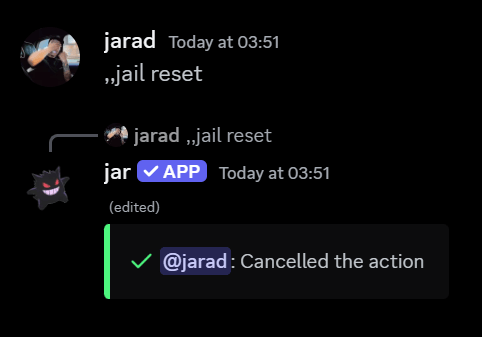
To reset the jail, you can run the `jail reset` command.
jar will ask you to confirm the reset, followed by a confirmation message.
* `#jar-jail` is what the bad actors will only see, restricting them from seeing any other channels.
* `#jail-logs` is where the actions taken against the bad actor will be logged.
## Customizing the jail
You can change the following settings for the jail.
You can use jail specific variables for both jail message types.
Check them out [here](/scripting/variables).
It is **not recommended** to change the jail channel, as the provided channel has the correct permissions set up for the jail role.
The channel where the jail message will be sent, along with what the bad actor will see.
```javascript Syntax theme={null}
jail channel
```
```javascript Example theme={null}
,,jail channel #prison-cell
```
The message that the bad actor will receive when they are jailed.
Leave the message blank to make jar send its default message.
```javascript Syntax theme={null}
jail dm [message]
```
```javascript Example theme={null}
,,jail dm You have been jailed by {moderator.mention} for {reason}
```
The channel where the jail actions are recorded.
```javascript Syntax theme={null}
jail logs
```
```javascript Example theme={null}
,,jail logs #prison-logs
```
The message that will be sent in the jail channel.
Leave the message blank to make jar send its default message.
```javascript Syntax theme={null}
jail message [message]
```
```javascript Example theme={null}
,,jail message {victim.mention} has been jailed by {moderator.mention} for {reason}
```
The action you want jar to take when dealing with roles. If set to `On`, jar will remove all roles from the bad actor when they are jailed.
```javascript Syntax theme={null}
jail strip
```
```javascript Example theme={null}
,,jail strip On
```
## Resetting the jail
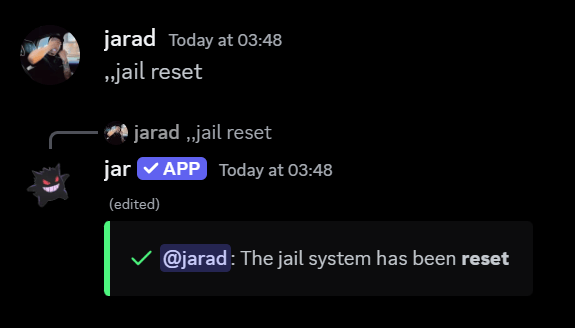
To reset the jail, you can run the `jail reset` command.
jar will ask you to confirm the reset, followed by a confirmation message.
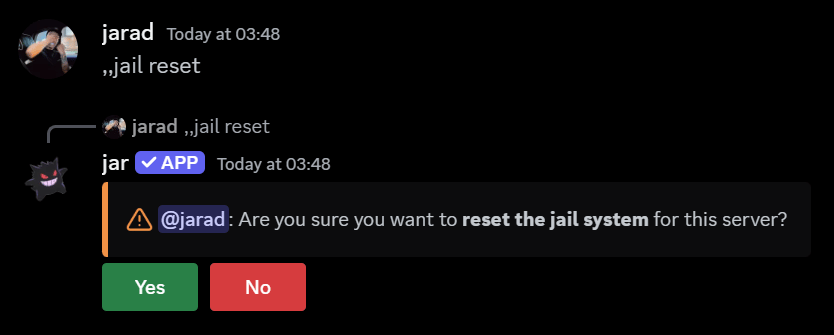 Pressing **Yes** will reset the jail, and you will see this confirmation message.
 Pressing **No** will cancel the reset, and you will see this message.