> ## Documentation Index
> Fetch the complete documentation index at: https://docs.jar.rip/llms.txt
> Use this file to discover all available pages before exploring further.
# Reaction Triggers
> Setup automatic reactions to messages in your server.
## Introduction
One of the most popular features, jar can automatically react to messages that contain specific keywords.
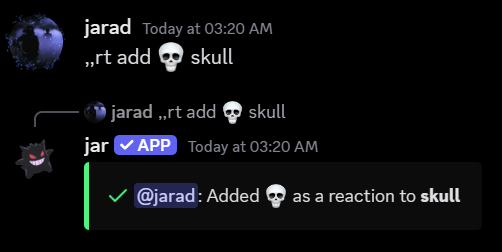
## Setting up a reaction trigger
To setup a reaction trigger, use the `rt add` command, followed by the emoji and trigger you'd like to use.
```ruby Syntax theme={null}
reaction add
```
```ruby Example theme={null}
,,reaction add 💀 skull
```
 ## Checking who made a reaction trigger
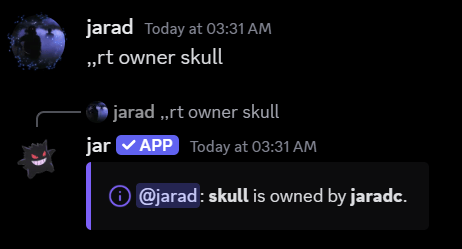
To check who made a reaction trigger, use the `rt owner` command, followed by the trigger you'd like to check.
```ruby Syntax theme={null}
reaction owner
```
```ruby Example theme={null}
,,reaction owner skull
```
## Checking who made a reaction trigger
To check who made a reaction trigger, use the `rt owner` command, followed by the trigger you'd like to check.
```ruby Syntax theme={null}
reaction owner
```
```ruby Example theme={null}
,,reaction owner skull
```
 ## Listing all reaction triggers
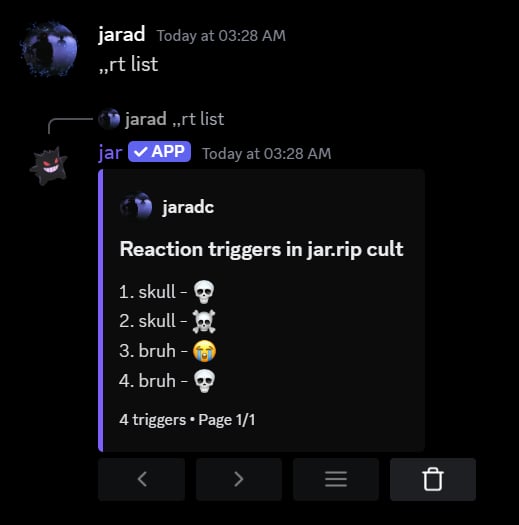
To list all reaction triggers in your server, use the `rt list` command.
```ruby Syntax theme={null}
reaction list
```
```ruby Example theme={null}
,,reaction list
```
## Listing all reaction triggers
To list all reaction triggers in your server, use the `rt list` command.
```ruby Syntax theme={null}
reaction list
```
```ruby Example theme={null}
,,reaction list
```
 ## Removing a reaction trigger
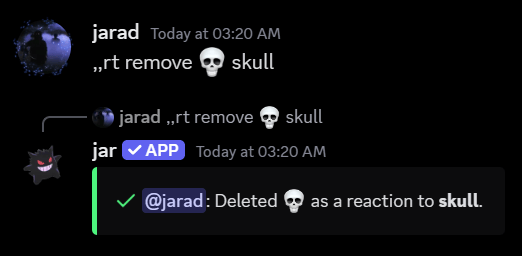
To remove a reaction trigger, use the `rt remove` command, followed by the emoji and trigger you'd like to remove.
```ruby Syntax theme={null}
reaction remove
```
```ruby Example theme={null}
,,reaction remove 💀 skull
```
## Removing a reaction trigger
To remove a reaction trigger, use the `rt remove` command, followed by the emoji and trigger you'd like to remove.
```ruby Syntax theme={null}
reaction remove
```
```ruby Example theme={null}
,,reaction remove 💀 skull
```
 ### Removing all reactions for a trigger
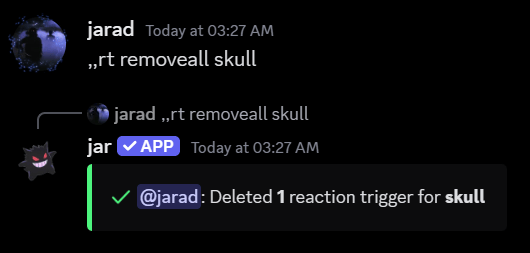
To remove all reactions for a trigger, use the `rt removeall` command, followed by the trigger you'd like to remove all reactions for.
```ruby Syntax theme={null}
reaction removeall
```
```ruby Example theme={null}
,,reaction removeall skull
```
### Removing all reactions for a trigger
To remove all reactions for a trigger, use the `rt removeall` command, followed by the trigger you'd like to remove all reactions for.
```ruby Syntax theme={null}
reaction removeall
```
```ruby Example theme={null}
,,reaction removeall skull
```
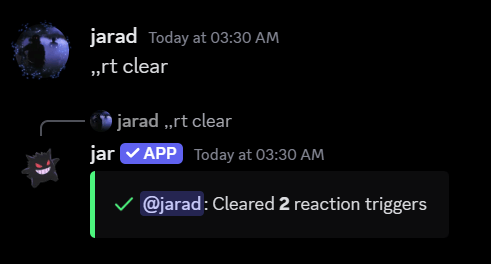
 ## Resetting all reaction triggers
To reset all reaction triggers in your server, use the `rt reset` command.
```ruby Syntax theme={null}
reaction reset
```
```ruby Example theme={null}
,,reaction reset
```
## Resetting all reaction triggers
To reset all reaction triggers in your server, use the `rt reset` command.
```ruby Syntax theme={null}
reaction reset
```
```ruby Example theme={null}
,,reaction reset
```